CAPTCHA Scams: the new trick that gets users to infect their own PCs
Cybercriminals are continually evolving their methods, and one of the latest threats is both simple and highly effective. A recent report from Malwarebytes highlights a growing trend of fake CAPTCHA websites that trick users into installing malware themselves, often without any awareness that something malicious has taken place. These attacks rely far more on user behaviour than technical vulnerabilities, making them particularly difficult to defend against without the right awareness.
What is the threat?
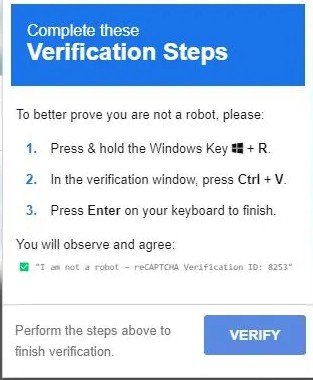
Most people are familiar with CAPTCHA checks, the quick “I’m not a robot” or “find the bus pictures” prompts used across the web. Attackers are now exploiting that familiarity and trust. Rather than presenting a legitimate verification step, malicious websites display a fake CAPTCHA that introduces unusual instructions for users to follow. While these instructions may appear harmless or routine, they are in fact designed to deliver malware onto the user’s device. The effectiveness of this technique lies in its simplicity. Instead of exploiting software flaws directly, attackers manipulate users into carrying out the attack on their behalf.
A typical scenario begins with a user visiting a website, often one offering media, downloads, or other popular content. The site presents what looks like a normal CAPTCHA challenge. After clicking the checkbox, instead of completing a standard verification, the user is given a set of instructions such as opening the Windows Run dialog, pasting content, and pressing enter.
Behind the scenes, the website has already placed a malicious command onto the user’s clipboard. When the user follows the instructions and pastes the content, they unknowingly execute that command. This action effectively bypasses traditional security checks because the execution is initiated by the user rather than a downloaded file.
Once executed, the command typically uses legitimate Windows tools to retrieve and run malicious content from the internet. The files involved are often disguised as harmless media formats, but they contain encoded scripts that run silently in the background.
In many cases, this leads to the installation of information-stealing malware. These types of threats are designed to harvest sensitive data from the device, including saved passwords, browser sessions, financial details, and other personal or business-critical information.
Why this is so effective
This approach is particularly dangerous because it targets human behaviour rather than technical weaknesses. Users are conditioned to trust CAPTCHA prompts and are unlikely to question them, especially when they appear as part of a normal browsing experience.
The attack also avoids many of the warning signs typically associated with malware. There are no suspicious attachments or obvious downloads, and the instructions themselves may look legitimate at first glance. In some cases, only part of the command is visible to the user, making it even harder to recognise that anything malicious is taking place.
Although this attack may initially appear to target individual users, the implications for organisations are significant. If an employee falls victim to this type of scam, the stolen credentials or access tokens can be used to compromise business systems, including email platforms, cloud services, and remote access tools.
From there, attackers may be able to move laterally within the environment, exfiltrate sensitive data, or establish a foothold for further attacks such as ransomware. The resulting impact can include data breaches, financial loss, operational disruption, and reputational damage.
How to protect your organisation
The primary defence against this type of threat is awareness, supported by the right technical controls.
Users should be cautious of any website that asks them to perform system-level actions as part of a verification process. A genuine CAPTCHA will never require someone to open the Run dialog or paste commands into their system. Encouraging users to question unusual instructions is critical.
At a technical level, organisations should ensure they have robust endpoint protection in place that can detect suspicious behaviours, not just known malware. Web filtering and DNS protection can help prevent users from reaching malicious sites in the first place, while browser security controls can limit the ability of websites to interact with the clipboard.
This threat highlights a shift in how cyber attacks are being carried out. Rather than relying solely on exploiting systems, attackers are increasingly focusing on manipulating users into taking actions themselves.
By combining social engineering with simple technical techniques, they are able to bypass many traditional security measures. As a result, organisations must place just as much emphasis on user awareness and behaviour as they do on technical defences.